> For the complete documentation index, see [llms.txt](https://docs.secoda.co/llms.txt). Markdown versions of documentation pages are available by appending `.md` to page URLs; this page is available as [Markdown](https://docs.secoda.co/features/ai-assistant/secoda-ai-agents.md).
# Agents
Turn your most valuable AI conversations into scheduled insights. Convert useful Secoda AI prompts into agents that run automatically and deliver results directly to your inbox.
### Overview
Agents let you schedule recurring runs of your most useful Secoda AI conversations. When you have a productive chat with Secoda AI and get valuable insights, you can convert that specific prompt into an agent that runs on your preferred schedule. They leverage Secoda's full multi-agent system and tools under the hood, giving you the same powerful analysis capabilities on autopilot.
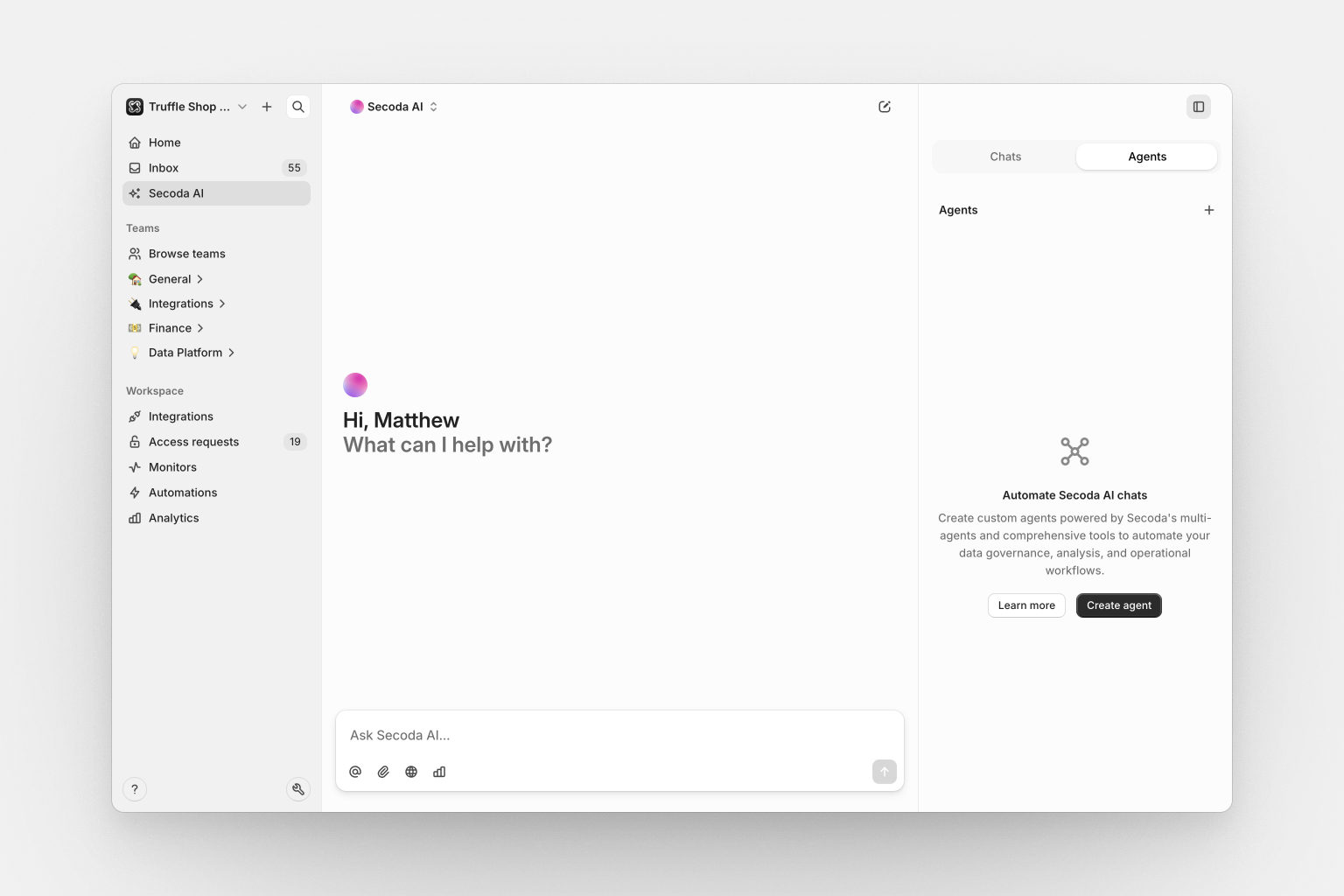
You can access agents in the Secoda AI chat interface by selecting the Agents tab.
#### 1. Create your agent
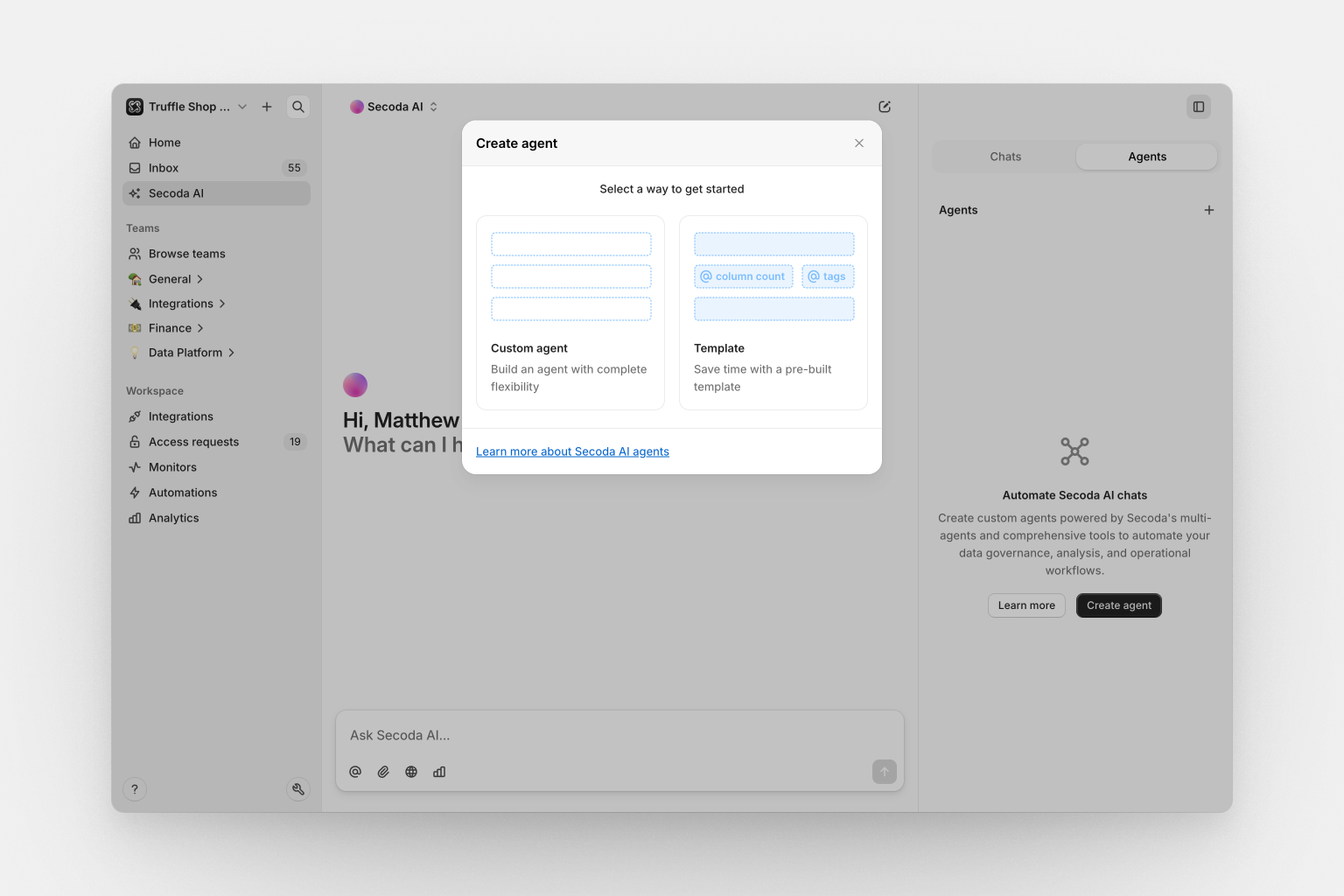
Start by creating an agent in one of two ways:
* **Custom agent**: Build from scratch with complete flexibility
* **Template**: Choose from pre-built templates for common use cases
### How it works
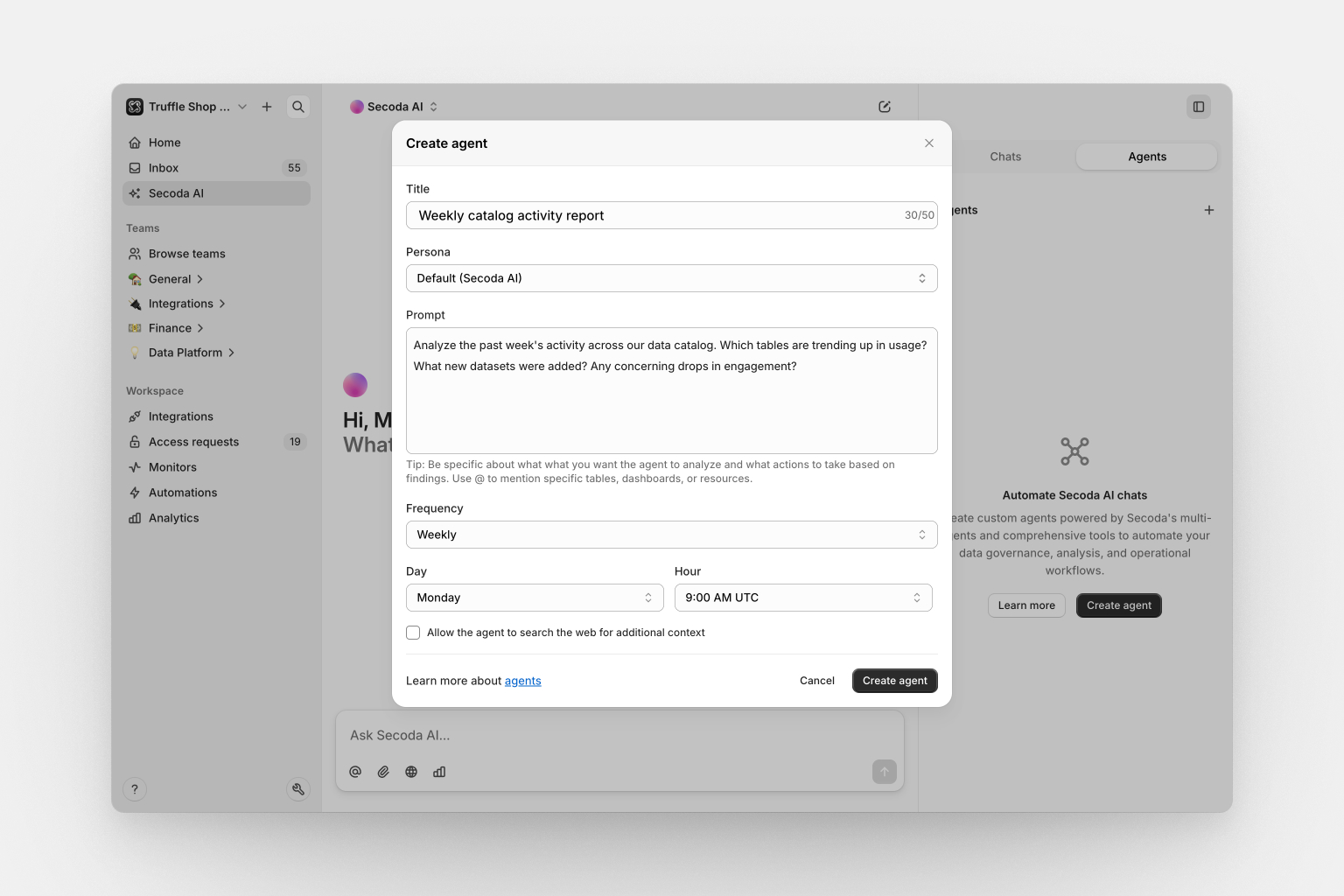
Set up your agent with:
* **Agent name**: A descriptive title for your agent
* **Persona**: Choose from available AI personas
* **Prompt**: Write the specific analysis or task you want automated
* **Schedule**: Set scheduling (minimum one-hour intervals)
* **Web search**: Enable external documentation research when relevant
#### 2. **Configure your agent**
#### 3. Schedule and monitor
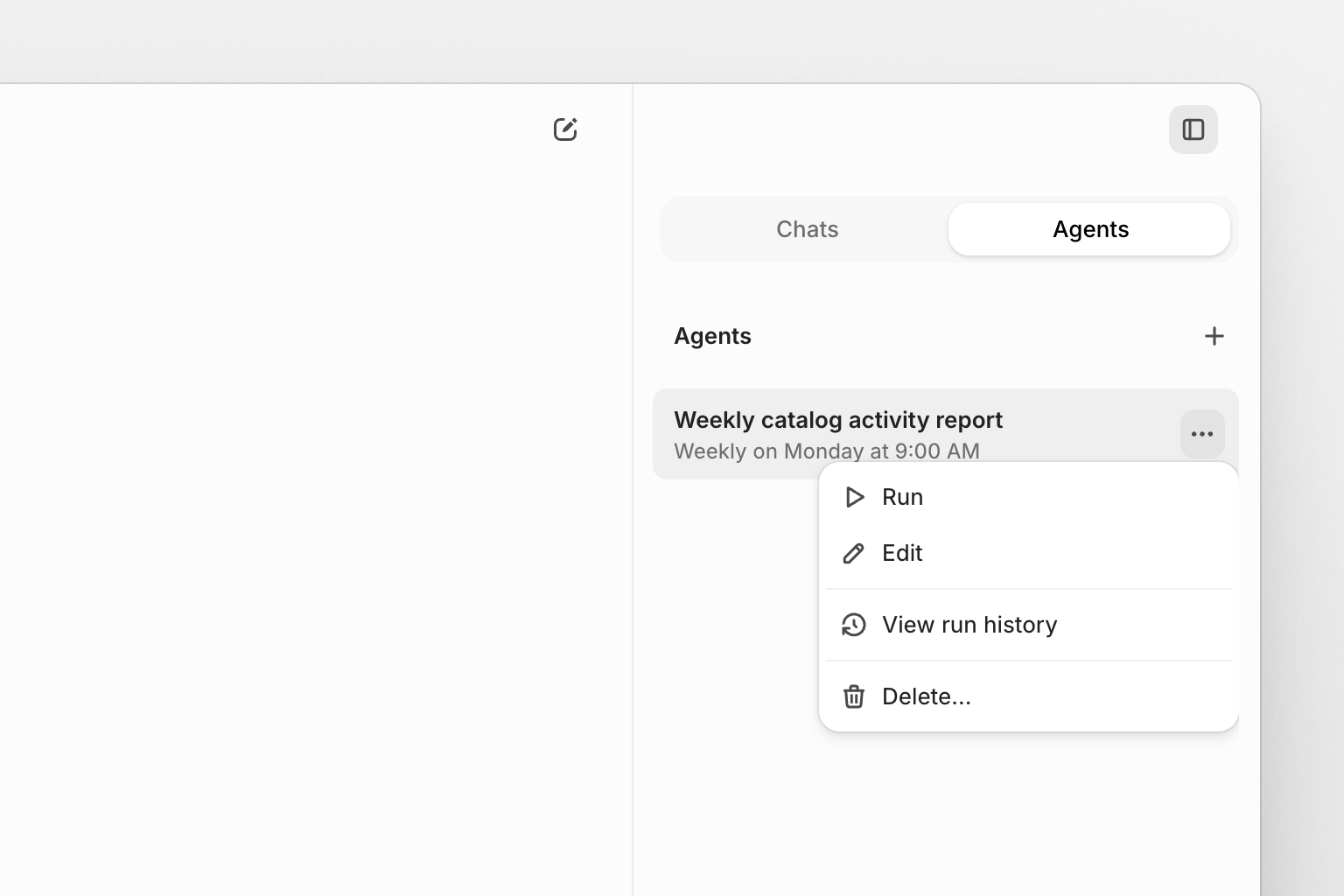
Your agent runs automatically according to your schedule. View execution history, run status, and manually trigger runs when needed.
#### 4. **Get results**
Each agent run creates a new conversation with the results. Access completed runs through the agent's run history or your AI chat history.
### What agents can do
Agents can automate any analysis or task that Secoda AI currently handles in conversations, powered by the same multi-agent system including:
#### Data discovery and analysis
* Search across tables, columns, charts, dashboards, and documentation
* Analyze data quality patterns and identify issues
* Track resource usage and access patterns
* Monitor schema changes and data freshness
#### Query analysis and performance
* Analyze SQL query execution history and performance
* Identify slow or expensive queries
* Track query usage patterns and optimization opportunities
* Monitor database performance trends
#### Automation and monitoring insights
* Review automation configurations and effectiveness
* Analyze automation triggers and actions
* Monitor automation run patterns and success rates
* Identify opportunities for process improvement
#### Policy and governance
* Track policy compliance and coverage
* Monitor data access patterns
* Identify governance gaps and recommendations
* Analyze policy effectiveness and usage
#### Documentation and knowledge
* Find resources missing descriptions or ownership
* Track documentation coverage and quality
* Suggest improvements to resource discoverability
* Identify knowledge sharing opportunities
*Note: Agents execute the same AI analysis you'd get in a live conversation, leveraging Secoda's specialized agents for search, query analysis, automation monitoring, and policy review.*
#### Example use cases
**Weekly data quality check**
```
Agent: "Data Quality Monitor"
Persona: Data Steward
Prompt: "Show me all tables that haven't been updated in the last week and identify any that might have data quality issues. Focus on tables in our production schema."
Schedule: 0 9 * * 1 (Every Monday at 9 AM)
```
**Daily query performance review**
```
Agent: "Query Performance Monitor"
Persona: Data Engineer
Prompt: "Identify the top 10 slowest queries from yesterday and analyze any performance bottlenecks or optimization opportunities."
Schedule: 0 8 * * * (Daily at 8 AM)
```
**Monthly governance audit**
```
Agent: "Governance Compliance Check"
Persona: Data Steward
Prompt: "Find tables containing potential PII that don't have proper governance tags or ownership assigned."
Schedule: 0 9 1 * * (First day of month at 9 AM)
```
**Automation health check**
```
Agent: "Automation Monitor"
Persona: Data Engineer
Prompt: "Review all automation runs from the past week and identify any that are failing consistently or need attention."
Schedule: 0 17 * * 5 (Friday at 5 PM)
```
### Frequently asked questions
#### How often can agents run?
Minimum interval is one hour. You can schedule daily, weekly, monthly, or any custom interval using cron expressions.
#### What happens if an agent fails?
Failed runs appear in the run history with error status. The agent continues with its next scheduled run as normal.
#### **Can I share agent results with my team?**
Agent results are AI conversations that can be shared like any other chat conversation in Secoda.
#### Do agents count against my AI usage?
Yes, agent executions use AI credits the same as interactive conversations.
#### Can agents create or modify data?
No, agents are read-only. They can only analyze and report on existing data and metadata.
#### What's the difference between agents and automations?
Agents perform AI analysis and create reports. Automations make changes to metadata like tags, descriptions, and assignments.
---
# Agent Instructions
This documentation is published with GitBook. GitBook is the documentation platform designed so that both humans and AI agents can read, navigate, and reason over technical content effectively. Learn more at gitbook.com.
## Querying This Documentation
If you need additional information that is not directly available in this page, you can query the documentation by asking a question.
Perform an HTTP GET request on the following URL with the `ask` and `goal` query parameters:
```
GET https://docs.secoda.co/features/ai-assistant/secoda-ai-agents.md?ask=&goal=
```
`ask` is the immediate question: it should be specific, self-contained, and written in natural language.
`goal` is what the user is ultimately trying to achieve, the reason they need the answer. Sharing it helps GitBook give you a better, more relevant answer. A goal is most helpful when it describes the outcome the user wants rather than restating the question. For example, with `ask=how do I create an API token`, a goal like `automate deployments from our CI pipeline` lets GitBook tailor the answer to that use case.
The response will contain a direct answer to the question and relevant excerpts and sources from the documentation.
Use this mechanism when the answer is not explicitly present in the current page, you need clarification or additional context, or you want to retrieve related documentation sections.